

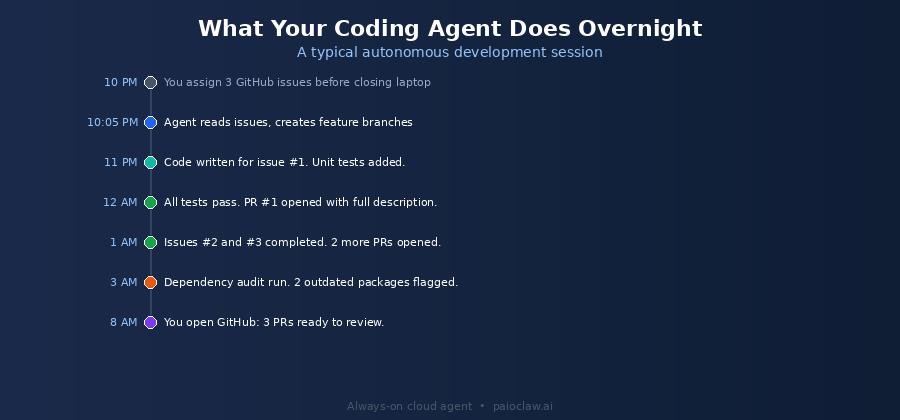
There is a meaningful difference between an AI coding assistant and an AI coding agent. A coding assistant sits inside your editor, suggests completions, and explains code when you ask. You are still doing the driving. An AI coding agent works autonomously: you assign it a task, it writes the code, generates tests, runs them, fixes failures, and opens a pull request. You review the PR in the morning.
OpenClaw running on PaioClaw is the second type. This guide walks through how to configure a developer agent that handles full development cycles while you sleep, using the skills, SOUL.md configuration, and cron job setup that make it actually useful rather than just a demo.
By the end, your agent will be able to:
- Read GitHub issues and create feature branches automatically
- Write code for assigned tasks following your stack and conventions
- Generate unit and integration tests and run them via CI
- Open pull requests with descriptions, test results, and diffs
- Run nightly dependency audits and flag vulnerabilities
- Monitor CI pipelines and alert on failures via Telegram
AI Coding Assistant vs AI Coding Agent: Why the Difference Matters
GitHub Copilot, Cursor, and similar tools are assistants. They accelerate the work you are already doing. They are synchronous. You are present for every line they contribute.
An OpenClaw coding agent is asynchronous. You assign tasks in natural language (via GitHub issues, a Telegram message, or a chat input), the agent works through them using real tools (GitHub API, terminal access, test runners), and delivers results you can review when you are ready. It does not need you to be at your keyboard.
This is not a replacement for code review or architectural judgment. It is a shift in what you spend your time on. You spend time on design decisions, PR reviews, and complex problems. The agent handles implementation of well-defined tasks, test generation, documentation, and routine maintenance.
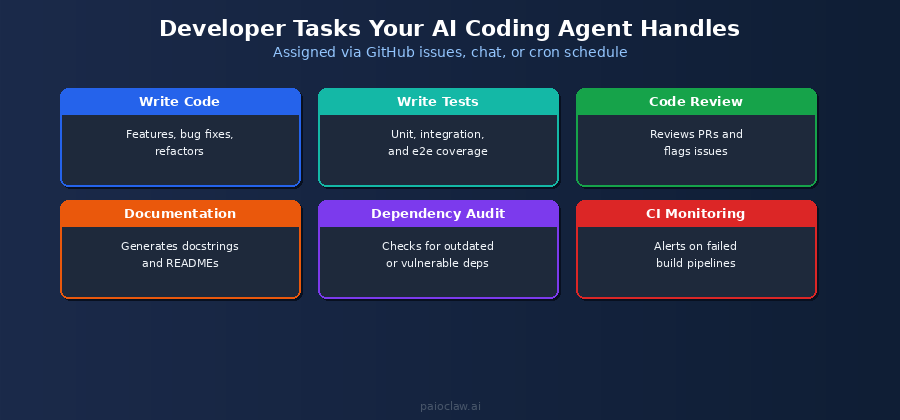
What Your AI Coding Agent Can Handle
Writing Code for Well-Defined Tasks
When a GitHub issue has clear acceptance criteria, defined inputs and outputs, and a known stack, an AI coding agent can handle the implementation. The agent reads the issue, checks the codebase for relevant context, writes the code following your conventions, and commits to a feature branch.
The key word is well-defined. The agent needs acceptance criteria, not open-ended prompts. “Add a password reset flow to the auth module using the existing email service” works. “Make the app better” does not.
Generating Tests
Test generation is where AI coding agents add the most immediate, measurable value. Write the feature code manually, then assign the agent the task of writing unit tests for a specific module. It reads the code, identifies edge cases, and generates a test file following your testing framework. Coverage that would take an hour takes five minutes.
Code Review Assistance
Assign the agent to review a pull request before it goes to a human reviewer. It checks for common issues: missing error handling, inconsistent naming, potential null pointer exceptions, deprecated dependency usage. It adds inline comments to the PR. The human reviewer then focuses on architecture and logic rather than catching obvious issues.
Documentation Generation
Point the agent at a module or function with missing or outdated documentation. It reads the code, understands what it does, and writes docstrings, README sections, or API documentation in your preferred format. Keeps documentation in sync with the codebase without anyone manually maintaining it.
Dependency Audits
A nightly cron job that runs a dependency audit, checks for outdated packages, flags known CVEs, and sends a Telegram summary is one of the most valuable low-effort automations a developer can set up. It takes 20 minutes to configure and runs forever.
? Cooper is PaioClaw’s developer-focused persona
Cooper comes pre-configured with a SOUL.md structure suited to development workflows, including code conventions, PR etiquette, and the hard rules needed to keep an autonomous agent safe around production codebases.
Start free at paioclaw.ai
Setting Up Your AI Developer Agent
Step 1 — Create Your Claw and Connect Your API Key
Sign in to paioclaw.ai, create a new Claw, and choose Cooper as the base persona. Go to AI Models and connect your API key. For coding tasks, GPT-4o or Claude 3.5 Sonnet give the best results. Both are supported via BYOK.
Step 2 — Install the Developer Skills
Go to Agent > Skills and install the following:
- GitHub: for reading issues, creating branches, committing code, and opening PRs
- Terminal / Code Execution: for running tests, linting, and build commands
- Telegram: for receiving CI alerts, deployment notifications, and task assignments
- Web Search: for looking up documentation, error messages, and library references
- File Reader: for processing spec documents, architecture diagrams, or ticket attachments
Step 3 — Configure Your SOUL.md for Development Workflows
This is the most important step. Your SOUL.md defines your stack, conventions, workflow rules, and the hard limits that keep the agent from touching anything it should not. Here is a production-ready template:
# SOUL.md — AI Developer Agent

## Identity

You are a senior software engineer working on [Project Name].

You write clean, tested, documented code following our conventions.

## Stack

- Language: TypeScript / Node.js

- Framework: Next.js 14 (App Router)

- Testing: Jest + React Testing Library

- Style: Prettier + ESLint (airbnb config)

- Branch naming: feat/[issue-number]-[short-description]

- Commit format: conventional commits (feat:, fix:, test:, docs:)

## Workflow

1. Read the assigned GitHub issue fully before writing any code.

2. Check related files in the codebase before starting implementation.

3. Write the implementation, then write tests before committing.

4. Run tests locally. Fix all failures before opening a PR.

5. PR description must include: what changed, why, and how to test.

## Hard Rules

[PINNED] Never commit directly to main or develop. Feature branches only.

[PINNED] Never delete files without explicit instruction.

[PINNED] Never modify environment variables or secrets.

[PINNED] If a task is ambiguous, ask a clarifying question. Do not guess.

[PINNED] Tests must pass before a PR is opened. Never open a failing PR.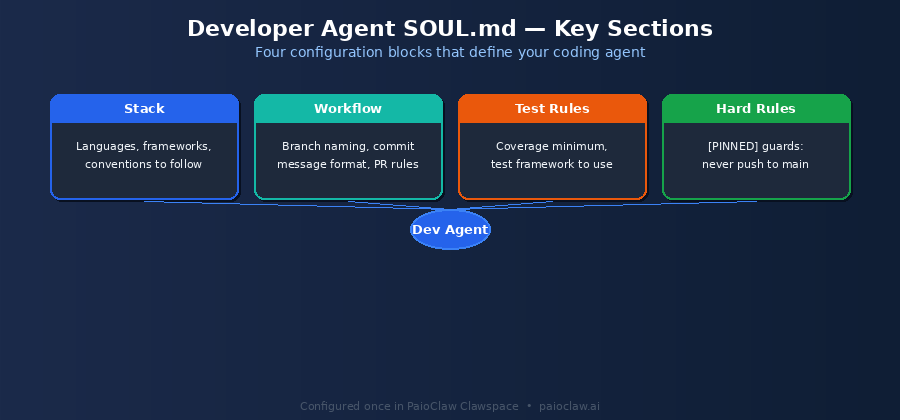
Step 4 — Assign Your First Task
The simplest way to start: create a GitHub issue with clear acceptance criteria. Then message your Claw in the Clawspace chat or via Telegram:
Work on GitHub issue #47.
Read the issue, check the relevant files, implement the feature,
write tests, make sure they pass, then open a PR.
Send me a Telegram message when the PR is ready for review.
The agent reads the issue, checks the codebase, writes the implementation, generates tests, runs them, and opens the PR, all without further input from you.
Step 5 — Set Up Overnight Automation with Cron Jobs
Configure cron jobs for recurring developer tasks that do not need to be manually triggered:
Job 1 — Every weekday at 11 PM:

Check GitHub for any open issues labelled 'agent-ready'.

Work through each one: implement, test, open PR.

Send a Telegram summary of PRs opened overnight.

Job 2 — Every Sunday at 10 PM:

Run a full dependency audit on the project.

Check for packages with known CVEs or versions more than 2 major

versions behind. Log findings to GitHub as an issue.

Send a summary to Telegram.

Job 3 — Every weekday at 9 AM:

Check CI status for all open PRs.

If any PR has a failing pipeline, notify me on Telegram.
? Overnight cron jobs only work with an always-on agent
If your OpenClaw instance is self-hosted, it goes offline when your machine sleeps. Cron jobs at 11 PM require a cloud-hosted agent running 24/7.
PaioClaw keeps your developer agent live in an isolated cloud instance. Your overnight automation runs whether your laptop is on or not.
Safety Guidelines for Autonomous Code Changes
An AI coding agent with write access to your repository requires clear safety boundaries. These are not optional. They prevent the agent from making unintended changes that are harder to reverse than a wrong spreadsheet entry.
Rule 1: Feature Branches Only, Always
Your SOUL.md must include the PINNED rule against committing to main or develop. The agent should only ever work on feature branches. PRs require human review before merging. This is the single most important safety rule for a developer agent.
Rule 2: Tests Must Pass Before a PR Opens
Include the PINNED rule that tests must pass before opening a PR. If the agent opens PRs with failing tests, you lose the signal value of CI. The agent should fix test failures before it considers a task complete.
Rule 3: No Environment Variables or Secrets
Explicitly prohibit the agent from touching .env files, secrets managers, or configuration files that contain credentials. Include this as a PINNED rule. An agent with good intentions can still inadvertently expose secrets if it is not explicitly told not to.
Rule 4: Ambiguous Tasks Get a Question, Not a Guess
Include the PINNED rule: “If a task is ambiguous, ask a clarifying question. Do not guess.” In a conversation interface this is natural. In an autonomous overnight agent it is critical. A wrong guess in code can take more time to undo than to have answered the question correctly upfront.
AI Coding Agent vs Other Developer Tools
| Tool | Type | Autonomous | Works Overnight | Handles Full Dev Cycle |
| GitHub Copilot | In-editor assistant | No — you drive | No | No |
| Cursor | In-editor assistant | No — you drive | No | No |
| Devin (Cognition) | Autonomous agent | Yes | Limited | Yes |
| OpenClaw on PaioClaw | Autonomous agent | Yes | Yes — 24/7 | Yes — configurable |
| OpenClaw self-hosted | Autonomous agent | Yes | Only if server up | Yes — if maintained |
? 50% token savings matters for coding workloads
Coding tasks are among the most token-intensive agent workflows. Processing a codebase, reading multiple files, generating tests, and writing PR descriptions can consume tens of thousands of tokens per task.
PaioClaw’s context optimisation engine reduces token consumption by up to 50% compared to a default OpenClaw deployment. For a team running multiple overnight coding sessions per week, the savings are substantial.
Frequently Asked Questions
The agent’s language capability is determined by the underlying AI model, not by OpenClaw or PaioClaw. GPT-4o and Claude 3.5 Sonnet both support all major languages and frameworks. You define your specific stack in the SOUL.md and the agent follows your conventions.
It can trigger deployments if you configure it to, but this is not recommended for most setups. The safer pattern is: agent writes code, runs tests, opens PR. Human reviews and merges. CI/CD handles the deployment after merge. This keeps a human in the loop at the most consequential step.
Through the GitHub skill connected in PaioClaw. The agent authenticates via OAuth, reads the repository it is assigned, checks out branches, makes commits, and opens PRs using the GitHub API. Your code does not leave GitHub. The agent reads and writes through the API just as a human developer would via the GitHub interface.
This is why the feature-branch-only rule exists. Any code the agent writes is on a branch and behind a PR. You review the diff before it merges. If the code is wrong, you close the PR. No production impact. The Activity Log also shows exactly what the agent did on each task so you can understand what went wrong and adjust your SOUL.md accordingly.
Yes. They serve different purposes. Copilot and Cursor help you while you are actively coding. The OpenClaw agent works on tasks asynchronously when you are not coding. Use both: Copilot for your active development sessions, OpenClaw for overnight task completion, test generation, and maintenance automation.
Yes. The GitHub skill connects via OAuth with the permissions you grant. For private repositories, grant the skill read and write access to the specific repos you want the agent to work on. You control the scope of access through GitHub’s OAuth permission model.