

OpenClaw is powerful, but self-hosting it means you also own every error it throws. A command that crashes with a JavaScript heap message. A gateway that says pairing is required. A token mismatch that stops your agent talking to its channels. Most of these have a specific, known fix, but the error messages rarely tell you which one you need.
This guide is the map. It groups the most common OpenClaw errors into two families, gives you the exact commands to fix each, and explains what the doctor –fix command actually does when you run it. Every fix here is drawn from documented OpenClaw failure patterns and the recovery steps that resolve them.
Work through it top to bottom, or jump to the section matching your symptom. If you would rather never see these errors in the first place, the last section covers the managed option that removes most of them entirely.
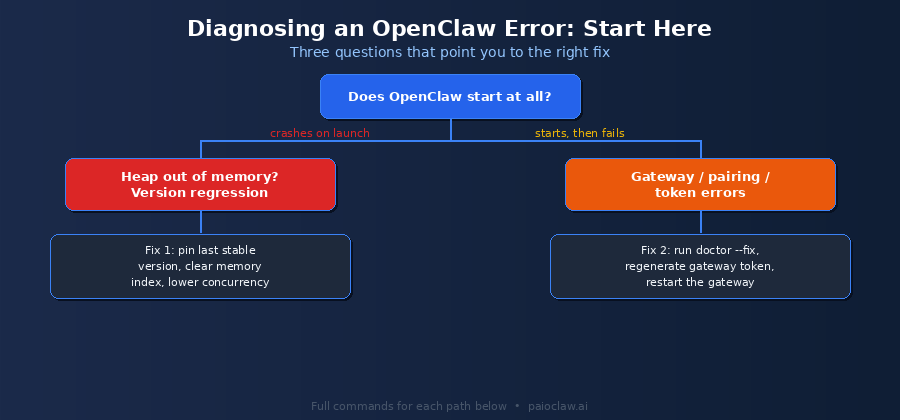
Start Here: Which Kind of Error Do You Have?
Almost every OpenClaw problem falls into one of two families, and the fix path is completely different for each. Before running any command, answer one question: does OpenClaw fail to start at all, or does it start and then fail later?
- Crashes on launch or during a CLI command, often with an out-of-memory message: this is almost always a version regression or a memory issue. Go to the OOM section.
- Starts fine, then fails when connecting: gateway not running, pairing required, or token mismatch errors. Go to the gateway section.
Getting this split right saves you time, because the OOM fixes will do nothing for a gateway token problem, and vice versa.
Family 1: Out-of-Memory Crashes
Out-of-memory (OOM) crashes are the most reported OpenClaw failure, and confusingly they have three distinct causes that produce a similar-looking symptom. Identifying which one you have is the whole battle.
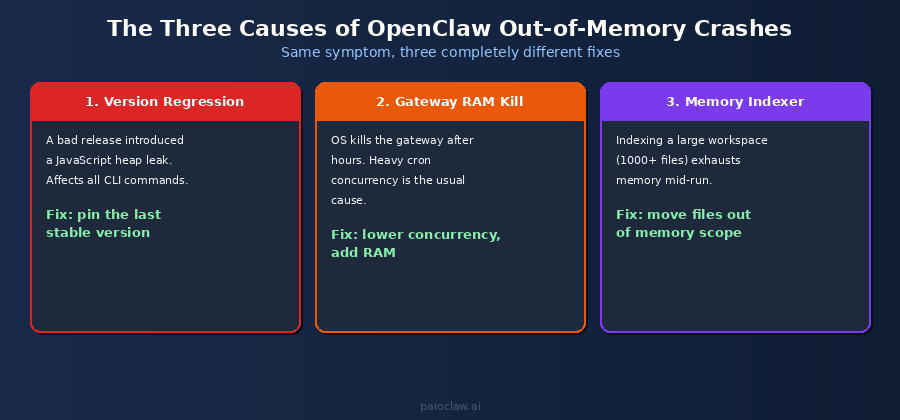
Cause 1: A Version Regression
A specific OpenClaw release introduced a JavaScript heap memory leak in core module loading. On affected versions, even basic CLI commands crash with a fatal heap error. If your crashes started right after an update, this is the likely cause.
The fix is to pin the last known stable version rather than run the affected release:
# Roll back to the last stable release

npm uninstall -g openclaw

npm install -g openclaw@<last-stable-version>

# Confirm the version and that basic commands run

openclaw --version

openclaw gateway status
If commands run cleanly after pinning, you have confirmed a version regression. Hold on that version until a later release fixes the leak, and avoid auto-updating in the meantime.
Cause 2: The OS Killed the Gateway (RAM Exhaustion)
Here the gateway runs fine at first, then dies after several hours. This is the operating system killing the process because it ran out of RAM, not an OpenClaw bug. The most common trigger is heavy cron concurrency on a small VPS.
Confirm it by checking the kernel log for an OOM kill entry:
# Look for an OOM kill of the gateway process

journalctl -k | grep -i -E 'oom|killed'

# If you see a kill entry, apply these in order of impact:

# 1. Lower maxConcurrentRuns in the cron section of your config

# 2. Disable channels one at a time to find a RAM-heavy one

# 3. Move the gateway to a VPS with 2GB+ RAM dedicated to it
Lowering cron concurrency resolves the majority of sustained OOM kills on shared VPS setups, because concurrent runs multiply peak memory usage.
Cause 3: The Memory Indexer Ran Out of Memory
This one appears only when indexing a large workspace, typically one with a thousand or more files. The index command fails partway with a fetch or memory error. The fix is to move non-essential files out of the memory scope before indexing:
# Move sessions and backups out of the indexing path

mv ~/.openclaw/workspace/sessions/ ~/openclaw-backup/sessions/

mv ~/.openclaw/workspace/backups/  ~/openclaw-backup/backups/

# Restart the gateway to reset the failure counter, then re-index

openclaw gateway restart

openclaw memory index --force
? Prevent OOM crashes before they happen
Set maxContextTokens to around 80% of your model’s context limit to avoid aggressive compaction, mark critical instructions with [PINNED] in SOUL.md so they survive compaction, and watch gateway memory live with: watch -n 5 ‘ps aux | grep openclaw’.
Family 2: Gateway, Pairing, and Token Errors
The gateway is the OpenClaw service that manages agent connections, channel routing, and skill execution. When it is not running, or when its authentication token is out of sync, your agent looks alive but cannot connect to anything. These are the errors that say things like gateway not running, pairing required, or gateway token mismatch.
The good news: one short command sequence resolves most of them.
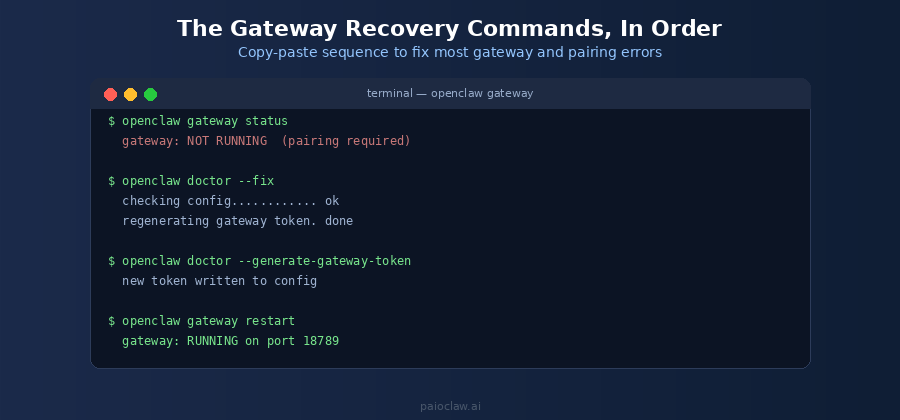
Step 1: Check the Gateway Status
Always start by confirming what state the gateway is actually in. This tells you whether you have a not-running problem or an authentication problem:
openclaw gateway status

# Possible outputs:

#   RUNNING on port 18789   -> gateway is up (problem is elsewhere)

#   NOT RUNNING             -> start or restart it

#   pairing required        -> token is missing or mismatched
Note the default gateway port is 18789. If something else is bound to that port, the gateway cannot start, which itself shows as a not-running error.
Step 2: Run doctor –fix (What It Actually Does)
The openclaw doctor –fix command is the single most useful recovery tool, and it is worth understanding what it does rather than treating it as magic. It runs a series of health checks on your installation and configuration, then repairs the ones it can fix automatically.
In practice, doctor –fix checks your config file for problems, verifies the gateway token exists and is consistent, regenerates a missing or mismatched token, and confirms the gateway can bind to its port. For the majority of pairing and token errors, this one command resolves the issue:
openclaw doctor --fix

# It will report each check and what it repaired, e.g.:

#   checking config ............ ok

#   gateway token .............. regenerated

#   port 18789 ................. available
Step 3: Regenerate the Gateway Token Explicitly
If doctor –fix did not resolve a token mismatch, or if you need to force a fresh token (for example after a credential rotation), generate one directly:
openclaw doctor --generate-gateway-token

# This writes a new gateway token to your config.

# Any client using the old token must be re-paired.
A token mismatch happens when the token stored on a client (a channel connection, a relay extension) no longer matches the one in your gateway config. Regenerating gives you a clean token, after which you re-pair your channels.
Step 4: Restart the Gateway
After any token change, restart the gateway so it loads the new configuration:
openclaw gateway restart

# Confirm it came back up cleanly

openclaw gateway status

#   -> RUNNING on port 18789
If status now shows RUNNING and your channels reconnect, the gateway family of errors is resolved. If it still fails to bind, check that no other process is holding port 18789 and that no stale lock file is left from a previous crash.
⚠️ If the gateway keeps dying after restart
A gateway that restarts cleanly but dies again within hours is not a token problem, it is the OOM kill from Family 1, Cause 2. Go back and check journalctl for an OOM kill, then lower cron concurrency or add RAM. Restarting a gateway that the OS keeps killing will not hold.
Quick Reference: Symptom to Fix
| Symptom | Likely Cause | First Command to Run |
| Heap out of memory on any command | Version regression | Pin last stable version |
| Gateway dies after hours | OS OOM kill (RAM) | journalctl -k | grep -i oom |
| memory index fails on large workspace | Indexer OOM | Move sessions/backups out, re-index |
| pairing required | Missing/mismatched token | openclaw doctor –fix |
| gateway token mismatch | Token out of sync | openclaw doctor –generate-gateway-token |
| gateway not running | Not started or port blocked | openclaw gateway restart |
| Channels disconnected | Token changed, not re-paired | Re-pair channels after restart |
The Deeper Problem With Self-Hosted Troubleshooting
Notice a pattern in all of the above: every fix is something you have to run, monitor, and maintain yourself. Version regressions mean you track releases and decide when to pin. OOM kills mean you size and watch the VPS. Token errors mean you regenerate and re-pair. And a crash at 3am means downtime until you are awake to run a restart.
That is the real cost of self-hosting, not any single error but the standing obligation to be the operations team for your own agent.
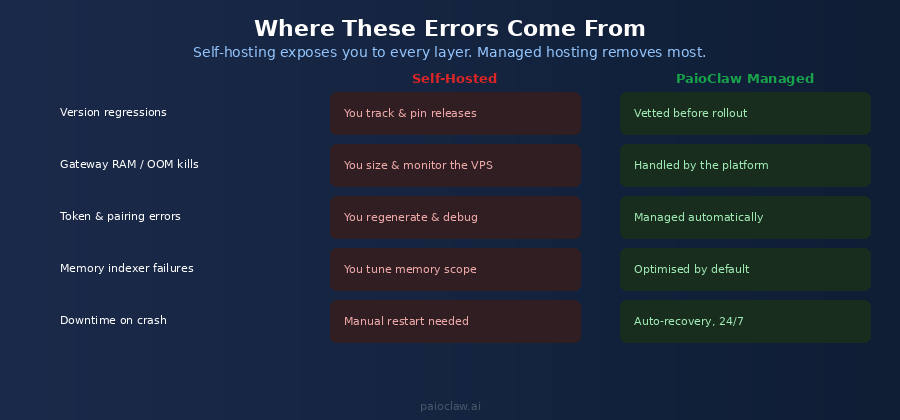
This is the layer PaioClaw removes. It runs your OpenClaw agent in a managed, isolated cloud instance, vets upstream releases before rolling them out (so a regression never reaches you), sizes and monitors the infrastructure (so OOM kills are handled at the platform level), and recovers automatically from crashes without you touching a terminal. The errors in this guide largely stop being your problem.
? Skip the troubleshooting entirely
PaioClaw provisions a managed OpenClaw agent in under 60 seconds, always-on and isolated. Version regressions are caught before rollout, infrastructure is monitored for you, and the gateway is managed automatically.
Start free with no credit card. If you are spending more time fixing OpenClaw than using it, managed hosting is the fix that removes the whole category.
Frequently Asked Questions
It runs a set of health checks on your OpenClaw installation and configuration, then automatically repairs the ones it can. In practice it validates your config file, checks and regenerates a missing or mismatched gateway token, and confirms the gateway can bind to its port. It is the first command to try for most pairing and token errors.
Run openclaw doctor –fix first, which repairs most token issues automatically. If the mismatch persists, run openclaw doctor –generate-gateway-token to write a fresh token, then openclaw gateway restart to load it, and re-pair any channels or clients that were using the old token.
This is almost always the operating system killing the process for using too much RAM, not an OpenClaw bug. Check with journalctl -k | grep -i oom. If you see a kill entry, lower maxConcurrentRuns in your cron config, disable heavy channels one at a time to find the culprit, or move the gateway to a VPS with at least 2GB of RAM dedicated to it.
The gateway runs on port 18789 by default. If the gateway will not start, confirm nothing else is bound to that port, since a port conflict shows up as a gateway-not-running error. You can check the gateway state at any time with openclaw gateway status.
If this started right after an update, you likely hit a version regression that introduced a memory leak. Roll back to the last stable release by uninstalling and reinstalling that specific version, then confirm with openclaw –version. If it started after adding a large workspace, it is more likely the memory indexer running out of memory, which you fix by moving sessions and backups out of the indexing path before re-indexing.
Most of them stem from operating the infrastructure yourself: tracking releases, sizing RAM, managing tokens, restarting after crashes. A managed OpenClaw host like PaioClaw takes over that layer, running your agent in a monitored cloud instance with vetted updates and automatic recovery, which removes most of the error categories in this guide. You keep the agent, you drop the operations burden.