

If you sell anything online, your competitors’ prices move constantly. They run flash sales, adjust for demand, and quietly undercut you on your best-selling products. Most businesses find out days later, after the sales have already gone elsewhere. By then the damage is done.
A competitor price monitoring agent fixes this. It checks your competitors’ product pages on a schedule you set, detects when a price changes or a new promotion appears, and alerts you within minutes. You react in real time instead of reading about it in a monthly report.
The good news: you do not need an expensive SaaS subscription or a developer to build one. Using OpenClaw on PaioClaw, you can set up a working price monitoring agent in about ten minutes. This guide walks through every step.
Why Manual Price Monitoring Fails
Most teams that try to track competitor pricing do it manually: someone opens a spreadsheet, visits ten competitor pages, notes the prices, and repeats this once a week if they remember. This breaks down for obvious reasons.
Prices change between checks, so a weekly review misses the flash sale that ran on Tuesday and ended Thursday. The task is tedious, so it gets skipped during busy periods, which are exactly when competitive pricing matters most. And it does not scale, because monitoring fifty products across five competitors by hand is a part-time job nobody wants.
An agent solves all three. It never forgets, it runs as often as you like, and it monitors as many products as you configure without additional effort. This is where AI automation earns its place: not glamorous, but a repetitive high-value task done reliably around the clock.
What the Agent Actually Does
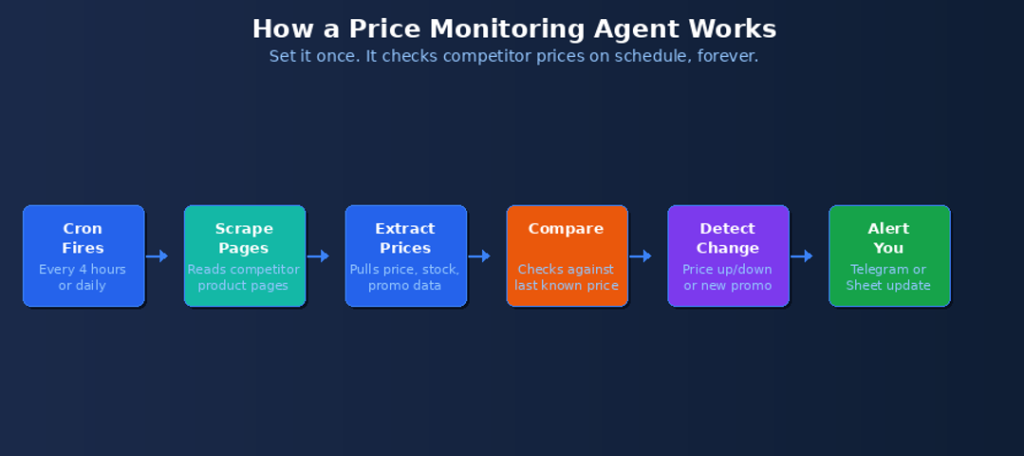
Here is the full loop your price monitoring agent runs, without any manual involvement after setup:
- A cron job fires on your schedule, for example every four hours
- The agent visits each competitor product URL you configured
- It extracts the current price, stock status, and any active promotion
- It compares each value against the last known value it stored
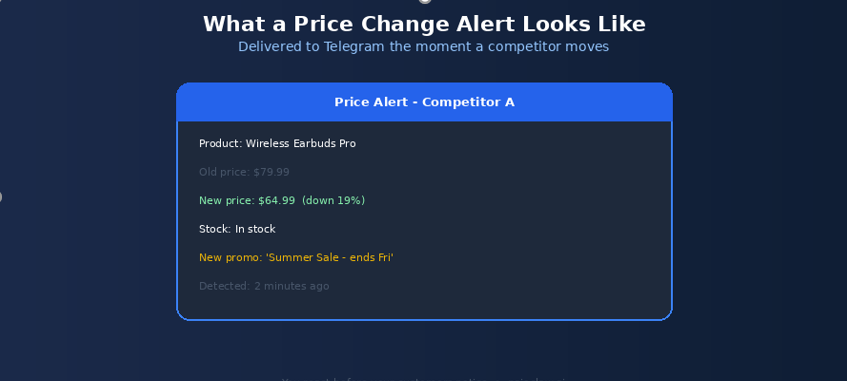
- If anything changed, it flags the specific change (price up, price down, new promo, back in stock)
- It sends you an alert on Telegram and logs the change to a Google Sheet
The 10-Minute Setup
The whole build takes about ten minutes. Here is the breakdown before we go step by step:
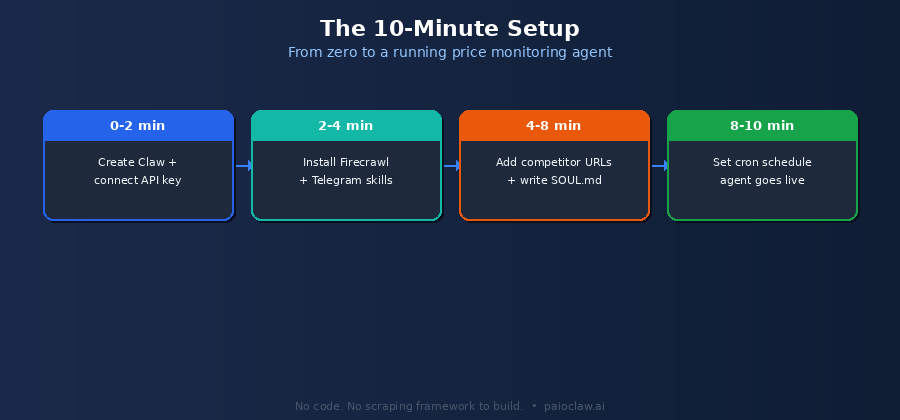
Minutes 0 to 2 – Create the Claw and Connect Your Key
Go to paioclaw.ai and create a free account. Create a new Claw named “Price Monitor” or similar. Go to AI Models and paste your OpenAI or Anthropic API key. For price extraction, a lower-cost model like GPT-4o mini works well because the task is structured and does not need deep reasoning.
Minutes 2 to 4 – Install the Skills
Go to Agent > Skills and install:
- Firecrawl or Web Scraper: to read competitor product pages reliably, including JavaScript-heavy sites
- Google Sheets: to store the price history and log every detected change
- Telegram: to receive instant alerts when a price moves
PaioClaw ships only pre-vetted skills from its curated library, so you are not pulling unaudited scraping code from a public marketplace. This matters for a task that runs unattended on a schedule.
Minutes 4 to 8 – Add Competitor URLs and Write SOUL.md
Create a Google Sheet with the products you want to track. A simple structure works best:
Columns: Product Name | Competitor | URL | Last Price | Last Checked | Notes

Example rows:

Wireless Earbuds Pro | CompetitorA | https://competitora.com/earbuds | | |

Wireless Earbuds Pro | CompetitorB | https://competitorb.com/buds-pro | | |

Standing Desk 120cm  | CompetitorA | https://competitora.com/desk-120 | | |
Then configure your agent’s behaviour in SOUL.md:
# SOUL.md - Competitor Price Monitoring Agent

## Identity

You are a competitor price monitoring agent for my business.

You track competitor product prices and alert me to changes.

## Task Behaviour

- Read the product list from my 'Price Monitor' Google Sheet.

- For each URL, extract: current price, stock status, any active promotion.

- Compare the current price to the 'Last Price' column.

- Update the sheet with the new price and current timestamp.

## Alerting Rules

- Only alert me when something CHANGES. Do not message me for no-change checks.

- For a price drop: alert with old price, new price, and percentage change.

- For a new promotion: alert with the promo text.

- For a stock change (out of / back in stock): alert me.

## Hard Rules

[PINNED] Never guess a price. If a page fails to load or the price is not found,

         log 'price not found' for that row and continue. Do not invent a number.

[PINNED] Always record the source URL and timestamp with every logged price.
Minutes 8 to 10 – Set the Schedule and Go Live
Go to Control > Cron Jobs and create the monitoring job:
Schedule: Every 4 hours (or daily at 8am for slower-moving markets)

Task: Read my Price Monitor Google Sheet.

      For each product URL, extract the current price, stock, and promotions.

      Compare to the last recorded price.

      Update the sheet with new values and timestamp.

      For any product where the price changed or a new promo appeared,

      send me a Telegram alert with the product, old price, new price,

      percentage change, and a link to the page.
Save it, and your agent is live. It will run on schedule from now on with no further input from you.
✅ Prerequisites checklist
A list of competitor product page URLs you want to monitor
A Google account for the tracking sheet
A Telegram account for alerts
An OpenAI or Anthropic API key
A free PaioClaw account
? Scheduled monitoring requires a 24/7 agent
A price monitoring agent is only useful if it runs on schedule, day and night. A self-hosted agent stops the moment your machine sleeps, so the 3am flash sale goes undetected.
PaioClaw runs your agent in an always-on isolated cloud instance. Your four-hour checks fire around the clock, and alerts reach your Telegram whether you are at your desk or asleep.
What This Costs vs Dedicated Price Monitoring Tools
Dedicated competitor price monitoring software is powerful but priced for enterprise budgets, often running into hundreds of dollars a month for meaningful product coverage. An agent you build yourself costs a fraction of that.
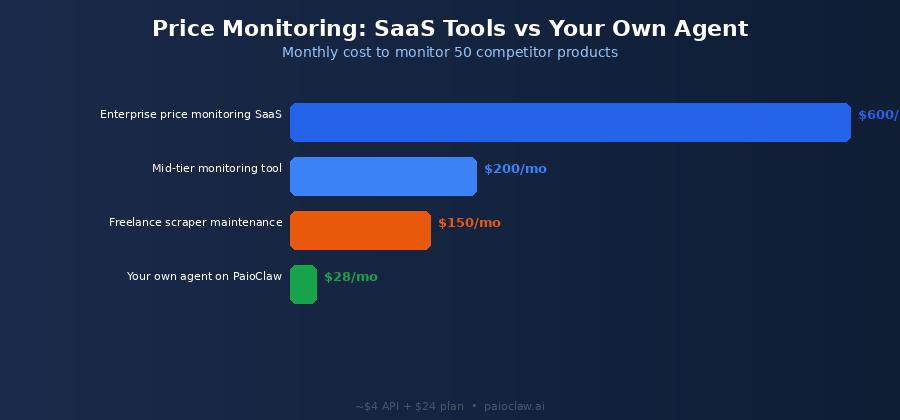
| Approach | Monthly Cost | Setup Effort | Flexibility |
| Enterprise monitoring SaaS | $300 to $600+ | Onboarding process | Locked to vendor features |
| Mid-tier monitoring tool | $100 to $250 | Account setup | Limited customisation |
| Freelance-built scraper | $150+ maintenance | Days of dev time | Breaks when sites change |
| Your own agent on PaioClaw | Approx $28 all in | 10 minutes | Fully customisable |
The roughly $28 figure is the Smart plan at $24 per month plus a few dollars of LLM API costs for regular checks across a modest product list. PaioClaw’s context optimisation reduces token consumption by up to 50 percent, which keeps the API portion low even as you add more products.
Going Further: Advanced Monitoring Ideas
Once the basic agent runs, you can extend it without rebuilding anything:
- Repricing suggestions: instruct the agent to recommend a new price for your matching product when a competitor drops below you
- Daily summary: add a second cron job that sends a once-daily digest of all price movements, separate from the instant alerts
- Stock alerts: get notified when a competitor sells out of a product, a signal to hold or raise your price
- New product detection: point the agent at a competitor category page to flag when they add a new SKU
- Weekly trend log: use the accumulated Google Sheet history to chart competitor pricing trends over time
A Note on Responsible Scraping
Monitoring publicly listed prices is a common and legitimate business practice, but do it responsibly. Keep your check frequency reasonable, for example every few hours rather than every minute, so you do not place unnecessary load on competitor sites. Respect any published terms of use, and focus on publicly available pricing information rather than attempting to access anything behind a login. A sensible schedule also keeps your own API costs down.
Frequently Asked Questions
No. Every step is configuration: connecting skills, filling in a Google Sheet, writing plain-language instructions in SOUL.md, and setting a cron schedule. There is no scraping framework to write or maintain, which is the part that normally requires a developer.
Yes. The Firecrawl skill renders pages including JavaScript-driven content, so it can read prices on modern e-commerce sites that build the page dynamically. If one particular site proves difficult, you can adjust the extraction instruction in your task to target the specific element.
As many as you list in your sheet. The practical limit is your API budget and your plan’s credit allowance, not the agent itself. Start with your most competitive twenty to fifty products, then expand. More products simply means the scheduled job checks more rows on each run.
As fast as your cron schedule. If you set checks every four hours, you will know within four hours of a change. For fast-moving markets you can check hourly; for stable markets a daily check is usually enough and keeps costs lower.
The PINNED rule in the SOUL.md template above instructs the agent to log ‘price not found’ for that row and continue, rather than inventing a price. On the next scheduled run it will try again. This keeps your data accurate and prevents false alerts from a temporary page error.
Yes. Add your own product URLs to the same sheet. The agent will track your live prices alongside competitors, which is a useful safeguard against pricing errors on your own store, for example a decimal-point mistake or a promotion that failed to expire.