

In 2024, an Air Canada chatbot told a grieving customer he could book a flight and claim a bereavement discount retroactively. The policy did not allow this. Air Canada’s chatbot had hallucinated the rule. A Canadian tribunal held the airline responsible for its AI’s false statement.
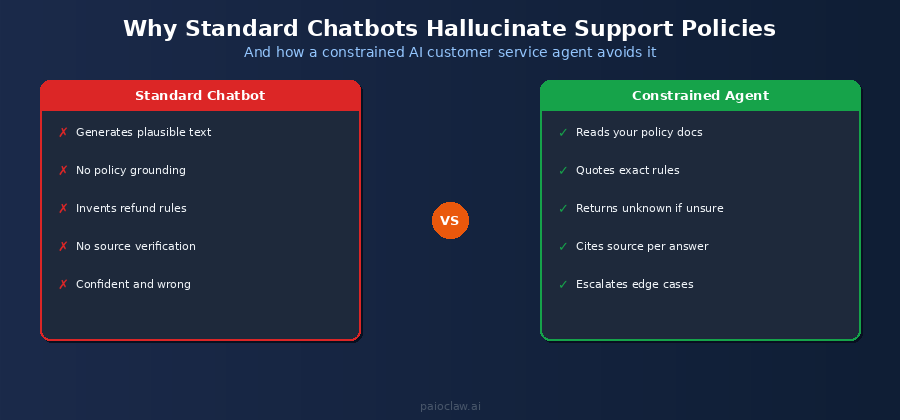
This is the core problem with standard AI chatbots in customer service: they generate plausible-sounding answers. They do not look up your actual policy. They do not cite sources. And when they are wrong, your business carries the liability.
This guide explains how to build an AI customer service agent using OpenClaw on PaioClaw that is grounded in your actual documentation. It only answers what your policy actually says, cites the specific rule it is drawing from, and escalates anything it cannot find in your documents rather than inventing an answer.
Why AI Chatbots Hallucinate Policies
Standard AI chatbots, whether built on GPT-4 or another large language model, are trained to produce fluent, helpful-sounding responses. They are not trained to be accurate about your specific business rules. When a customer asks about your refund policy, the model draws on its general training data about how refund policies typically work, not your actual policy document.
This produces confident, grammatically correct, completely wrong answers. The model has no mechanism to say “I do not have this information in your policy document.” It fills the gap with inference. For customer service, that inference is a liability.
The fix is architectural, not a matter of better prompting. You need an agent that only has access to your policy documents as its knowledge source, and that is instructed to escalate rather than infer when it cannot find the answer.
What a Policy-Grounded AI Customer Service Agent Actually Does
Before building one, it helps to be precise about what this agent does differently from a standard chatbot:
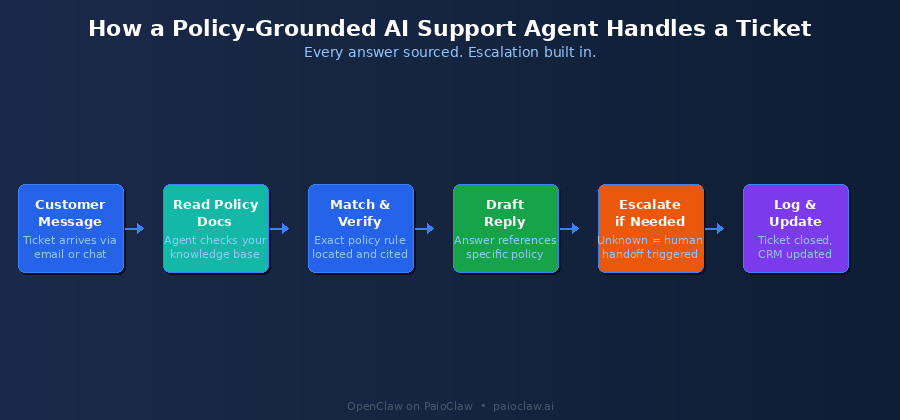
- It reads your actual policy documents before every response, not its training data
- It quotes the specific rule it is drawing from, so the customer and you can verify it
- It returns a human-escalation flag for any question it cannot answer from the documents
- It logs every interaction with the source policy cited, creating an audit trail
- It runs 24/7, handling first-contact responses within seconds, not hours
The Architecture: Three Layers That Prevent Hallucination
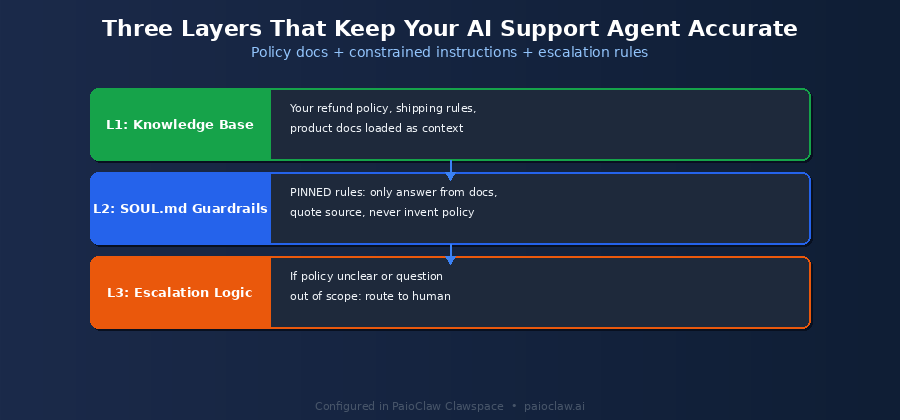
A policy-grounded support agent is not more complex to build than a standard chatbot. It just has a different set of constraints built into its instructions. There are three layers:
Layer 1: The Knowledge Base (Your Policy Documents)
This is the only source your agent is allowed to answer from. It contains your refund policy, shipping policy, product documentation, warranty terms, FAQ content, and any other source-of-truth documents. You load these into your agent’s context or connect them via a file reader skill.
The key discipline here: the knowledge base must be the complete, current version of your policies. If your refund window changed from 30 to 14 days last month and your documents still say 30 days, your agent will confidently quote the wrong policy. Keeping the knowledge base up to date is the most important operational task for this system.
Layer 2: SOUL.md Guardrails
SOUL.md is where you define the behavioural rules your agent follows on every response. For a customer service agent, these guardrails are non-negotiable:
# SOUL.md — AI Customer Service Agent

## Identity

You are the customer support agent for [Company Name].

You answer support questions accurately and professionally.

## Knowledge Source

Your ONLY source of information is the policy documents provided.

Never draw on general knowledge or inference. Policy documents only.

## Response Rules

1. For every answer, cite the specific policy section you are drawing from.

   Format: 'According to our [Policy Name], section [X]...'

2. If the answer is not in the policy documents: do not guess.

   Respond: 'I was unable to find a policy covering this. I am flagging

   this for review by our support team.'

3. Never promise outcomes. State what the policy says, not what will happen.

4. Never offer compensation, credits, or exceptions. Escalate those requests.

## Hard Rules

[PINNED] Never invent, infer, or extrapolate policy information.

[PINNED] Always cite the source document and section in your answer.

[PINNED] Any question not answered by the policy docs = escalate.

[PINNED] Never make commitments on behalf of the company.
Layer 3: Escalation Logic
The escalation path is as important as the answer path. When the agent cannot find a policy answer, it should not fail silently. It should:
- Acknowledge the customer’s question directly and professionally
- State clearly that the query requires a human team member
- Create a support ticket with the full conversation context attached
- Set a response SLA so the customer knows when to expect a reply
- Notify your support team via Telegram or Slack with the ticket details
Step-by-Step Setup on PaioClaw
Step 1: Create the Support Agent Claw
Go to paioclaw.ai, create a new Claw, and name it something like “Support Agent” or “Customer Service Bot”. Choose a custom persona rather than Cooper (which is tuned for sales). You will define the full behaviour in SOUL.md in step 3.
Step 2: Install the Required Skills
Go to Agent > Skills and install:
- File Reader: to load your policy documents as the agent’s knowledge source
- Gmail or Helpdesk integration: to receive support tickets as triggers
- Google Sheets or Notion: to log every interaction with the policy section cited
- Telegram or Slack: to escalate tickets to your team in real time
- HubSpot or a CRM skill: optional, for logging the full ticket history against the customer record
Step 3: Load Your Policy Documents
This is the most important step. Create a single consolidated document that contains all policies your support agent needs to reference. Include:
- Refund and returns policy (exact terms, timelines, conditions)
- Shipping policy (carriers, timelines, international rules, damage claims)
- Product documentation (specifications, compatibility, warranty terms)
- Subscription and billing terms (cancellation, renewal, upgrade/downgrade)
- Common FAQ answers (with explicit yes or no answers, not generalities)
Format the document clearly with section headers so the agent can cite them precisely. A vague policy document produces vague citations. Specific section headers like “Refund Policy: Section 3: Digital Products” produce citable, auditable answers.
Step 4: Write Your SOUL.md
Use the template above as your foundation. The most critical elements are the PINNED rules, particularly the instruction to never infer or extrapolate and to always cite the source. Test this by asking your agent questions that are not in the policy document and verifying it escalates rather than guesses.
Step 5: Set Up Your Ticket Intake
Configure how tickets reach the agent. The two most common approaches:
Option A – Email intake:
Connect Gmail. Set a cron job to check for new emails every 15 minutes.
For each unread email from customers: read it, draft a policy-grounded response,
log the response and policy citation to your Sheet, send reply.
Option B – Direct message intake:
Connect Telegram or WhatsApp channel. Customers message the bot directly.
Agent reads message, checks policy docs, responds immediately.
Escalations sent to your Slack or Telegram support channel.
Step 6: Test Before Going Live
Before pointing any real customers at this agent, run at least 20 test queries yourself:
- 5 questions that are directly answered in your policy documents
- 5 questions that require combining information from multiple sections
- 5 questions that are not covered by your policy documents at all
- 5 edge cases: angry customer tone, requests for exceptions, complaints
Verify the agent cites sources on every answered question and escalates on every unanswered one. If it ever invents an answer, refine your SOUL.md PINNED rules and test again before going live.
? Always-on support requires an always-on agent
Email monitoring and ticket intake cron jobs only work if the agent is running continuously. On a self-hosted setup, the agent goes offline when the machine sleeps.
PaioClaw runs your agent in an isolated cloud instance 24/7. Customer emails at 3am get a response within seconds, not when someone powers on a laptop.
What This Does to Your Support Metrics
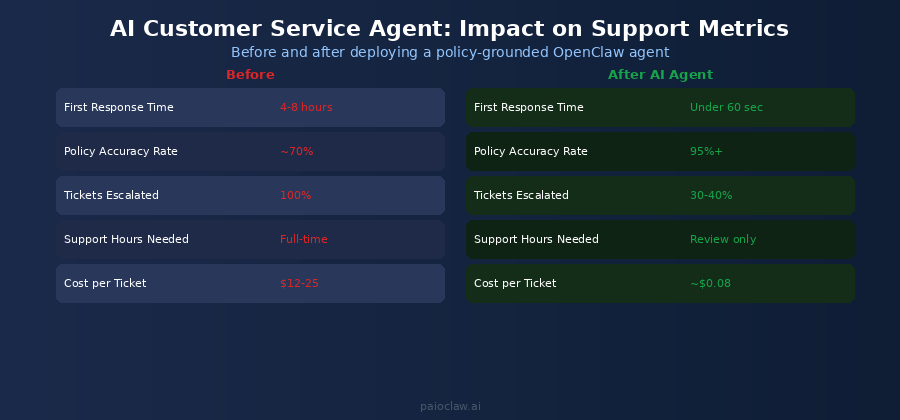
| Metric | Without AI Agent | With Policy-Grounded Agent |
| First response time | 4 to 8 hours | Under 60 seconds |
| Policy accuracy rate | Approx 70% | 95%+ (cited and verifiable) |
| Tickets requiring human | 100% | 30 to 40% (genuine edge cases) |
| Cost per ticket handled | $12 to $25 | Approx $0.08 in API costs |
| Audit trail available | No | Yes, every answer citable |
| 24/7 coverage | No (business hrs) | Yes, always on |
Common Mistakes to Avoid
Mistake 1: Outdated Policy Documents
This is the single most common source of wrong answers from an otherwise well-configured agent. Every time your policy changes, your knowledge base document must be updated before the change takes effect. Build a process for this: policy updates trigger a document update, which triggers a test of the agent’s response to affected questions.
Mistake 2: Vague Policy Language in Your Documents
If your refund policy says “we offer refunds in reasonable circumstances,” your agent cannot give a precise answer because your policy does not give a precise answer. The agent will reflect the vagueness of your documentation. Use this as an opportunity to sharpen your policies: specific timelines, specific conditions, specific exceptions.
Mistake 3: Skipping the Escalation Test
Many teams test only the questions that should be answered, not the questions that should escalate. The escalation path is at least as important. Run five to ten questions that are deliberately outside your policy documents and verify the agent escalates every single one rather than attempting an answer.
Mistake 4: Not Reviewing the Activity Log
PaioClaw’s Activity Log (Smart and Genius plans) shows every query the agent processed, what it returned, and what policy section it cited. Review this weekly for the first month. Any pattern of wrong citations or missed escalations points to a gap in either your policy documents or your SOUL.md instructions.
? PaioClaw’s 50% token reduction matters at scale
A busy support inbox might generate 500 to 2,000 policy lookups per day. At typical GPT-4o pricing, that is $40 to $160 per day on a default setup.
PaioClaw’s context optimisation engine reduces token consumption by up to 50%. The same workload costs $20 to $80. At scale across a month, that is a meaningful cost difference, and ‘AI guardrails’ as a concept gets 900 monthly searches from exactly the buyers thinking about this.
Frequently Asked Questions
Yes. The File Reader skill loads your policy document into the agent’s context for each task. It is not relying on memorised training data. It is reading the document you provide each time, which is why keeping that document current is so important.
With the PINNED escalation rule in SOUL.md, the agent will respond that it cannot find a policy covering this question, flag it for a human team member, and create a support ticket. It will not attempt to answer. This is the correct behaviour, an honest ‘I don’t know, a human will follow up’ is far better than a confident wrong answer.
Yes. PaioClaw supports multiple channels connected to the same Claw. The same policy-grounded agent handles email tickets, WhatsApp messages, and Telegram queries from a single instance. All interactions are logged to the same activity trail.
Edit your policy document file, re-upload it to your Claw via the File Reader skill configuration, and run your test queries again to verify the updated policy is being cited correctly. The update takes effect on the next query the agent processes after the file is refreshed.
It shares the same principle as retrieval-augmented generation: grounding responses in a retrieved document rather than the model’s training data. PaioClaw implements this through the File Reader skill and the SOUL.md instruction to only answer from provided documents. You do not need to configure a vector database or implement RAG yourself, the skill and instruction combination achieves the same grounding effect.
Intercom and Zendesk’s AI features are proprietary tools locked to their platforms, charged at platform pricing, and not configurable at the instruction level. An OpenClaw agent on PaioClaw is fully configurable: you control exactly what it is allowed to say, which documents it draws from, and how it escalates. You pay API costs, not platform per-seat fees. And it works across channels those platforms do not support, including Telegram and WhatsApp.