

You have probably seen someone on LinkedIn post about their AI agent that researches prospects, writes personalised outreach, and pushes contacts straight into their CRM, all while they sleep. And you have probably thought: that sounds incredible, but I am not a developer.
Here is the thing: you do not need to be. AI for lead generation has crossed the line from developer playground to something anyone with a laptop and a Google account can actually set up. In this guide, we will walk you through how to build a working AI lead generation agent using OpenClaw, and how to do it without touching a single line of code.
By the end, your agent will be able to:
- Research prospects from a list of company names or LinkedIn URLs
- Write personalised outreach emails for each contact
- Log everything into a CRM or Google Sheet automatically
- Run on a schedule, even at 3am, without you being involved
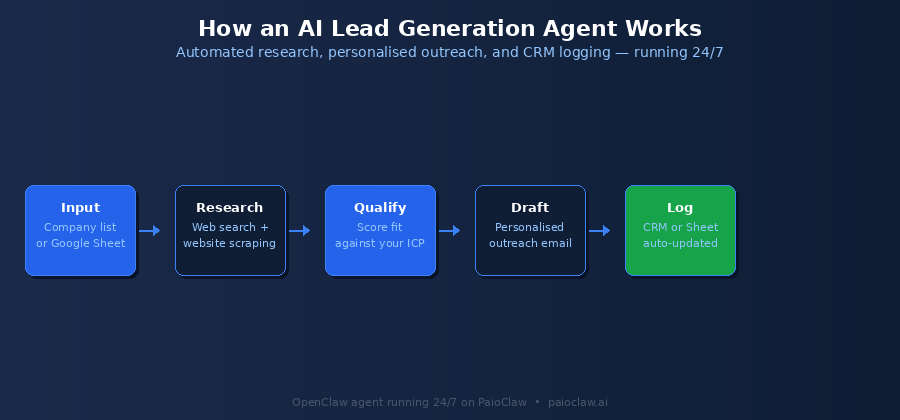
What Is an AI Lead Generation Agent, Actually?
An AI lead generation agent is an autonomous AI that handles the repetitive, research-heavy work of filling your pipeline. Instead of you manually Googling each prospect, reading their LinkedIn, figuring out what to say, and logging it all somewhere, the agent does it.
The difference between this and a chatbot is important: a chatbot responds to you. An agent acts on your behalf. You give it a goal like “find 20 qualified prospects in SaaS who recently raised Series A funding” and it goes and does the work, using tools like web search, email, and your CRM to complete it.
OpenClaw is the open-source framework that powers this kind of autonomous agent. It is the engine underneath. PaioClaw is the platform that lets you run it without managing servers, Docker containers, or configuration files.
Why Lead Generation Is the Perfect First AI Agent Use Case
Lead generation has three characteristics that make it ideal for AI automation:
1. It Is Research-Heavy and Repetitive
The core of lead gen, finding a prospect, reading their company page, checking their LinkedIn, forming a view on fit, is the same process repeated hundreds of times. It is exactly the kind of structured, repeatable task AI handles well.
2. The Output Is a Document, Not a Decision
Your agent’s job is not to decide whether to close a deal. It is to produce a researched contact record and a draft email. That is a contained, verifiable output you can review before anything goes out. No autonomous action, no risk.
3. The Time Savings Are Immediate and Measurable
If manual prospect research takes you 15 minutes per contact, an AI lead generation agent working overnight on a list of 50 names saves you 12 or more hours before you even get to work. The ROI is visible in the first week.
Skip the setup entirely
PaioClaw comes with a pre-built AI Sales Assistant persona called Cooper, already configured for lead generation and outreach workflows. You can have it running in under 60 seconds, no terminal required.
Start free at paioclaw.ai
What You Will Need Before You Start
Prerequisites — No Technical Skills Required
A PaioClaw account (free to start, no credit card needed)
An OpenAI or Anthropic API key (available free from platform.openai.com)
A Google Sheet or Notion database to store your leads (optional but recommended)
A list of target company names, domains, or LinkedIn URLs to research
That is genuinely it. No Docker. No server. No Python environment. PaioClaw handles the entire infrastructure layer. You just connect your API key and start.
Step-by-Step: Building Your AI Lead Generation Agent
Step 1 — Create Your PaioClaw Account
Head to paioclaw.ai and sign up with Google or email. You will land in the Clawspace, your agent dashboard. On the free plan (Curious), you get 60 AI credits per month to get started.
Click Create New Claw in the dashboard. You will be asked to name it and choose a base persona. Select Cooper, PaioClaw’s developer and sales focused persona. It comes pre-configured with a system prompt and skill set tuned for exactly this kind of lead research and outreach workflow.
Step 2 — Connect Your AI Provider
In the dashboard sidebar, go to AI Models. You will see a field to paste your API key. Paste your OpenAI or Anthropic key here.
This is the BYOK (Bring Your Own Key) model: PaioClaw does not intercept or mark up your API calls. Your key talks directly to your provider. PaioClaw handles the orchestration, routing tasks, managing context, and optimising token usage so you use up to 50% fewer tokens on the same workload.
# You will paste something like this into the AI Models field:
OpenAI Key:    sk-proj-xxxxxxxxxxxxxxxxxxxxxxxxxxxxxxxxxxxxxxxxxxxx
Anthropic Key: sk-ant-api03-xxxxxxxxxxxxxxxxxxxxxxxxxxxxxxxxxxxxxxxx

# That is all. PaioClaw handles the rest.
Step 3 — Install the Lead Generation Skills
Skills are the tools your agent uses to take action. Think of them as plugins. For a lead generation workflow, you will want to install:
- Web Search: lets your agent research prospects by searching the web in real-time
- Firecrawl: lets your agent read the full content of company websites, not just the homepage snippet
- Gmail or SMTP: if you want the agent to draft or send outreach emails from your inbox
- Google Sheets: to log each researched prospect automatically into a spreadsheet
To install: go to Agent > Skills in the sidebar. Search for each skill name and click Install. Each installs with a one-click OAuth connection, no configuration files, no API key juggling beyond the initial step.
PaioClaw skills are pre-vetted
The public OpenClaw skill marketplace (ClawHub) had 800+ malicious skills discovered in a single 2026 disclosure event. PaioClaw only ships reviewed, audited skills. You are not pulling unvetted code from a public repository.
Every skill installed through the PaioClaw dashboard has been examined before it reaches your agent.
Step 4 — Write Your Agent’s Instructions (SOUL.md)
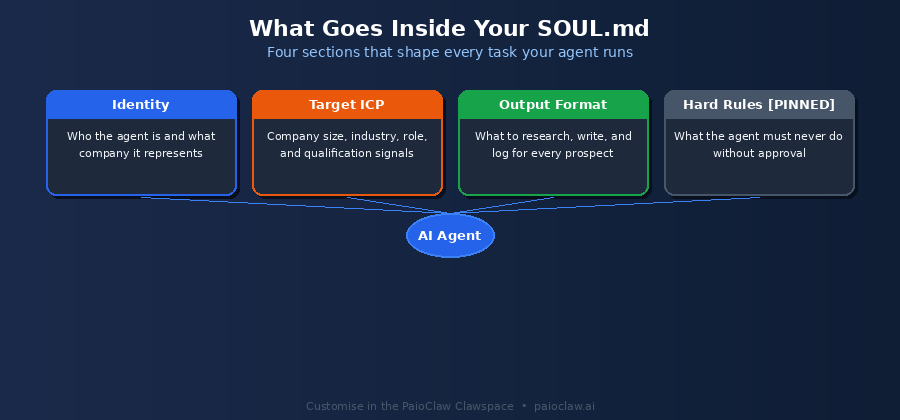
This is where you tell your agent what it is, what it is supposed to do, and how to do it. In PaioClaw, this file is called SOUL.md. It is the system prompt that shapes your agent’s behaviour on every task.
You do not need to write this from scratch. Cooper comes with a default SOUL.md pre-built for sales and outreach workflows. But you will want to customise it with:
- Your company name and what you sell
- Your ideal customer profile (ICP): who you are targeting and why
- Your outreach tone: formal, conversational, brief, or detailed
- What NOT to do, for example never send an email without your approval
Here is a simple SOUL.md template for lead generation:
# SOUL.md — Lead Generation Agent

## Identity
You are a professional lead research assistant working for [Your Company].
Your job is to research prospects, assess fit, and draft personalised outreach.

## Target Customer Profile
- Company size: 10-200 employees
- Industry: SaaS, fintech, or e-commerce
- Role of contact: Founder, VP Sales, or Head of Growth
- Signal: Recently raised funding OR headcount growing 20%+

## For Each Prospect, Produce:
1. Company overview (2-3 sentences from their website)
2. Why they are a good fit (1-2 sentences referencing the signal)
3. Personalised outreach email (150 words max, conversational tone)
4. Log all output to Google Sheets

## Hard Rules
[PINNED] Never send an email. Only draft it. Always wait for human approval.
[PINNED] Do not invent facts. Only use information found via web search.
Step 5 — Set Up Your Lead Input
Your agent needs a list of prospects to work from. The simplest approach: paste a list of company names or URLs directly into the chat composer. For example:
Research these 5 prospects and draft outreach for each:
1. Loom (loom.com)
2. Deel (letsdeel.com)
3. Notion (notion.so)
4. Linear (linear.app)
5. Retool (retool.com)

For each: company overview, fit rationale, outreach email draft.
Log all results to my Google Sheet: [paste Sheet URL]
You can also connect a Google Sheet as your input source. Paste the URL of a sheet with a column of company names or domains, and instruct the agent to work through each row.
Step 6 — Set Up a Cron Job for Automated Lead Research
This is the step that turns your agent from a helpful tool into a 24/7 lead generation engine. A cron job is a scheduled task. You configure it once, and your agent runs it automatically on a schedule.
In the Clawspace dashboard, go to Control > Cron Jobs. Click New Job. Configure it like this:
Schedule:  Every weekday at 7:00 AM
Task:      Check my lead input sheet for any new rows added since last run.
           Research each new prospect. Draft outreach. Log to output sheet.
           Send me a Telegram summary of what you found.
Now your agent wakes up every morning, processes any new prospects you have added to your input sheet overnight, and has your researched leads and draft emails waiting when you start work.

This is what always-on actually means
The cron job above only works if your agent is running 24/7 in the cloud. On a self-hosted setup, if your machine sleeps, the job does not fire.
PaioClaw keeps your agent live in an isolated cloud instance at all times. No server to manage, no missed schedules, no reconnection failures.
What Your Lead Generation Agent Can Do
Use Case A: Building a Prospect List from Scratch
Give your agent a search task: “Find 20 SaaS companies in the UK with 50-200 employees that have posted a Sales role in the last 30 days.” The agent uses web search and Firecrawl to find and verify candidates, then logs them to your sheet with company name, website, headcount signal, and a fit score.
Use Case B: Personalised Outreach at Scale
Paste 50 company names. The agent visits each company’s website, reads the About page and recent news, identifies the right contact, and drafts a personalised 3-sentence intro email referencing something specific about their business. Output: 50 ready-to-review emails in your Gmail drafts folder.
Use Case C: Ongoing Trigger-Based Lead Research
Connect a news RSS feed for your industry. The agent monitors it daily. When it spots a signal like a funding announcement, a leadership hire, or a product launch, it researches the company, assesses fit, drafts outreach, and adds it to your CRM. You come in each morning to warm, timely leads.
PaioClaw’s Cooper persona does all of this out of the box
Cooper is PaioClaw’s sales and developer-focused AI persona. It comes pre-configured with the SOUL.md structure, skill set, and workflow logic for lead research and outreach.
You do not need to build from scratch. Pick Cooper, connect your API key, customise the ICP section of your SOUL.md, and you have a working lead generation agent in under 5 minutes.
Common Mistakes to Avoid
Mistake 1: Letting the Agent Send Emails Autonomously
Until you have reviewed the quality of your agent’s outreach drafts and are confident in its tone and accuracy, always set it to draft, not send. Add the rule “Never send email. Only draft.” to your SOUL.md hard rules. One hallucinated fact in a cold email can do real damage.
Mistake 2: Giving It Vague Target Criteria
“Find good leads” produces garbage. “Find SaaS companies, 20-100 employees, HQ in Germany, posting a VP Sales role right now, with a Crunchbase profile” produces usable results. The more specific your ICP definition in SOUL.md, the better the research quality.
Mistake 3: Running One Giant Claw for Everything
Keep lead generation separate from your communications and content Claws. When different agents share context, quality degrades. PaioClaw supports multiple Claws under one account, each isolated, each focused. Build one Claw per function.
Mistake 4: Ignoring the Activity Log
PaioClaw’s Activity Log (available on Smart and Genius plans) shows you exactly what your agent did on each task: what it searched, what it found, what it wrote. Check it for the first few days after launch to verify the agent is working as expected and catch any drift in behaviour early.
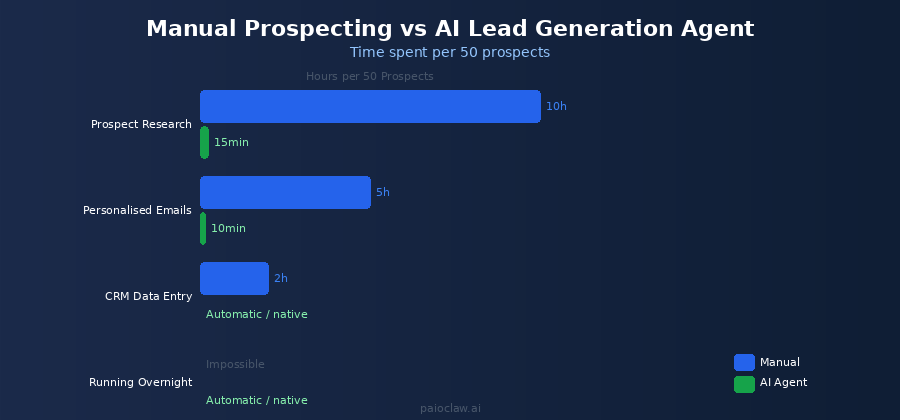
AI Lead Generation vs Manual: What You Actually Save
| Task | Manual (50 prospects) | AI Agent (50 prospects) |
| Prospect research | 8 to 10 hours | About 15 minutes |
| Personalised emails | 3 to 5 hours | About 10 minutes |
| CRM data entry | 1 to 2 hours | Automatic |
| Running overnight | Impossible | Native via cron job |
| Cost per contact | Your hourly rate | Approx $0.04 in API tokens |
Why OpenClaw and PaioClaw vs Other No-Code AI Agent Builders
There are other no-code AI agent builder tools on the market. Here is why OpenClaw running on PaioClaw is different:
- Full autonomy: most no-code tools are workflow builders like Zapier or Make. OpenClaw is a reasoning agent that makes decisions and handles ambiguity. It can handle tasks you cannot fully pre-script.
- 2,000+ integrations: PaioClaw connects to over 2,000 tools via one-click OAuth. Most agent builders cap out at 100 to 300.
- 50% token cost reduction: PaioClaw’s infrastructure optimises context management so you spend half as much on API calls as you would running OpenClaw yourself.
- Security-first: OpenClaw’s public skill marketplace had 800+ malicious skills in a 2026 disclosure. PaioClaw’s pre-vetted skill library means you are not exposed to that risk.
- You own your agent: no vendor lock-in to a proprietary platform. OpenClaw is open source, your data stays in your isolated instance, and you control everything.
Taking Your Lead Generation Agent Further
Add a LinkedIn Research Skill
With the browser relay skill enabled, your agent can visit public LinkedIn pages and extract role history, recent posts, and shared connections. This lets it write genuinely personalised emails that reference the prospect’s actual work, not just their company’s homepage.
Use Memory for Running Lead Lists
Tell your agent to add researched prospects to its MEMORY.md. This means when you run the same research task next week, it will not re-research contacts it has already found. It builds a growing database of researched leads over time.
Create a Lead Scoring Rubric
Add a scoring section to your SOUL.md: “Score each prospect 1 to 10 based on fit criteria. Only log prospects scoring 7 or above.” Your agent will filter its own output before logging anything, saving you the triage work.
Connect to Your CRM Directly
PaioClaw integrates with HubSpot, Pipedrive, Salesforce, and other major CRMs via its skills library. Instead of logging to a Google Sheet as an intermediate step, your agent can create contact records and deals directly in your CRM with all the research data attached.
Ready to build your lead generation agent?
PaioClaw is free to start. You can have a working AI lead generation agent using OpenClaw, with the Cooper persona pre-configured for sales outreach, in under 5 minutes.
Free plan includes 60 AI credits per month. No credit card required.
Start at paioclaw.ai, create a new Claw, choose Cooper, connect your API key.
Frequently Asked Questions
No. PaioClaw is designed for non-technical users. You connect skills via one-click OAuth, write your agent instructions in plain English in the SOUL.md editor, and set up cron jobs through a form interface. There is no terminal, no Docker, no configuration files.
No. ChatGPT is a conversational AI. It responds to prompts in a session and forgets everything when you close the tab. An AI lead generation agent built on OpenClaw is autonomous: it runs scheduled tasks, uses real tools like web search and your CRM, maintains persistent memory, and works while you are not there. It is a fundamentally different category of tool.
Your cost is your AI provider’s API fees plus your PaioClaw plan. At typical lead research task complexity, a GPT-4o API call costs roughly $0.02 to $0.05 per prospect researched. PaioClaw’s token optimisation reduces this by up to 50%. On the free plan, 60 credits covers initial testing. The Smart plan at $24 per month with 200 credits supports a solid weekly lead research workflow.
Only if you explicitly configure it to. The SOUL.md instructions you write control this. Best practice for any new lead generation agent is to set a hard rule: “Never send email. Only draft and log.” Review the first 20 to 30 outreach drafts manually before you consider enabling auto-send for any segment.
Zapier and Make are workflow builders. They connect predefined triggers to predefined actions. They cannot reason, handle ambiguity, or adapt to variation. An AI lead generation agent built on OpenClaw can look at a company website it has never seen, form a view on fit, write a contextually appropriate email, and handle edge cases. It is reasoning-based automation, not rule-based.
Yes. Each PaioClaw agent runs in an isolated cloud instance. Your prospect data, research output, and email drafts are not shared with other users, not used for training, and not accessed by PaioClaw for any purpose other than running your agent. All data is encrypted at rest and in transit.