

The average undergraduate research paper requires finding 8 to 12 credible sources, reading each one, extracting key arguments, organising notes, building a bibliography, and drafting a structured literature review. Depending on the topic and database search skills, that process takes 15 to 30 hours per assignment.
A personal AI research agent running on OpenClaw does not write your paper for you. What it does is handle the infrastructure of research: finding papers, summarising PDFs, generating citations, organising notes by topic, and drafting literature review sections from your collected sources. You still read, think, and write. You just stop spending 60 percent of your research time on mechanical tasks.
This guide shows you how to set one up using PaioClaw, with no technical skills required.
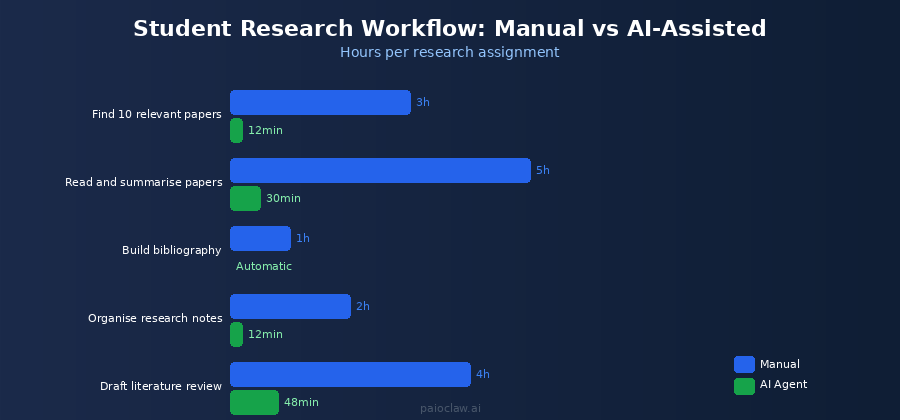
What a Personal AI Research Agent Can and Cannot Do
Before setting this up, it is worth being clear about the distinction:
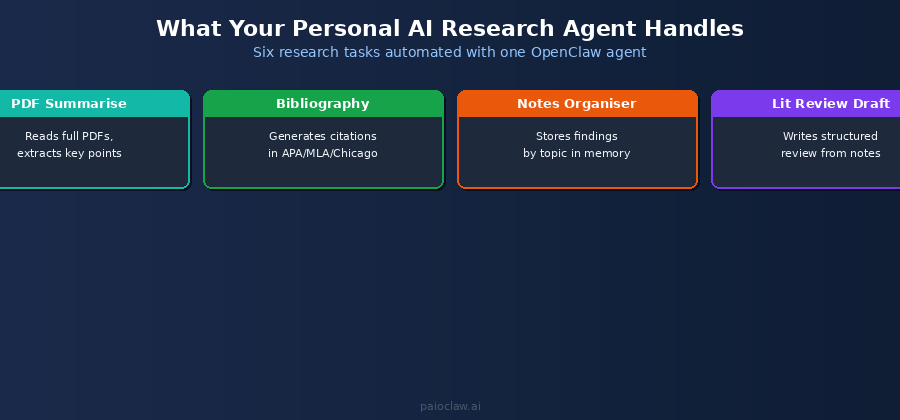
What it can do
- Search arXiv, Semantic Scholar, and the open web for papers matching your topic
- Read and summarise PDF papers, extracting key arguments, methodology, and findings
- Generate formatted citations in APA, MLA, Chicago, or Harvard
- Organise your notes by theme or argument across multiple papers
- Draft a structured literature review outline or introduction from your collected sources
- Send you a daily digest of new papers published in your research area
- Answer questions about a paper you have uploaded without you re-reading it
What it cannot do (and should not)
- Write your final essay or dissertation for you — that is academic misconduct
- Guarantee accuracy of complex technical claims — always verify key points
- Access paywalled journal databases it does not have credentials for
- Replace critical thinking, argument formation, or your own intellectual contribution
Used within those boundaries, this is a productivity tool, not a cheat. It handles the mechanical layer of research so you can spend your time on the intellectual layer.
The student audience is large and underserved by most AI tooling content, which tends to target enterprise or developer users.
Setting Up Your Personal AI Research Agent
Step 1 — Create Your PaioClaw Account and Claw
Go to paioclaw.ai and sign up for free. No credit card needed. The free plan gives you 60 AI credits per month, which is enough to validate the setup and run a small research workflow.
Create a new Claw and name it “Research Assistant” or something specific to your subject: “Economics Research” or “Lit Review Agent”. This Claw will become your persistent research partner, remembering your topic, your accumulated notes, and your citation list across every session.
Step 2 — Connect Your API Key
Go to AI Models in the sidebar and paste an OpenAI or Anthropic API key. If you are a student and cost is a concern, GPT-4o mini is the most economical model for summarisation tasks. A full research session summarising 10 papers costs roughly $0.05 to $0.15 in API fees.
Step 3 — Install the Research Skills
Go to Agent > Skills and install:
- Web Search: to find papers and research sources on the open web
- File Reader: to read and summarise uploaded PDF papers
- Firecrawl: to read full arXiv pages and extract paper abstracts and metadata
- Google Sheets: to maintain your running bibliography and research notes
- Telegram: to receive your daily research digest and send tasks on the go
- Notion (optional): for a more structured research notes workspace
Step 4 — Configure Your SOUL.md
SOUL.md defines how your agent behaves. For a research assistant, the key sections are your research profile, citation rules, and the hard rules around source quality. Here is a complete template:
# SOUL.md — Personal Research Assistant

## Identity

You are my personal academic research assistant.

I am a [undergraduate/postgraduate] student studying [Subject] at [University].

My current research focus is: [your topic].

## Research Standards

- Only cite peer-reviewed sources unless I explicitly ask for other source types.

- Papers must be published after [year, e.g. 2018] unless I specify otherwise.

- Always include: author, year, title, journal, DOI when available.

- Citation format: [APA / MLA / Chicago — choose one].

## Summary Format

When summarising a paper, always include:

1. Research question / objective

2. Methodology (brief)

3. Key findings (3-5 bullet points)

4. Limitations noted by the authors

5. How it relates to my research topic

## Note-Taking

Store all paper summaries in my Google Sheet named 'Research Notes'.

Columns: Author/Year | Title | Key Finding | My Topic Relevance | Citation

## Hard Rules

[PINNED] Never fabricate citations. If you cannot find a real DOI or source,

         say so. I will verify and find the source myself.

[PINNED] Never present summaries as my original analysis.

         Always label them as summaries of the cited work.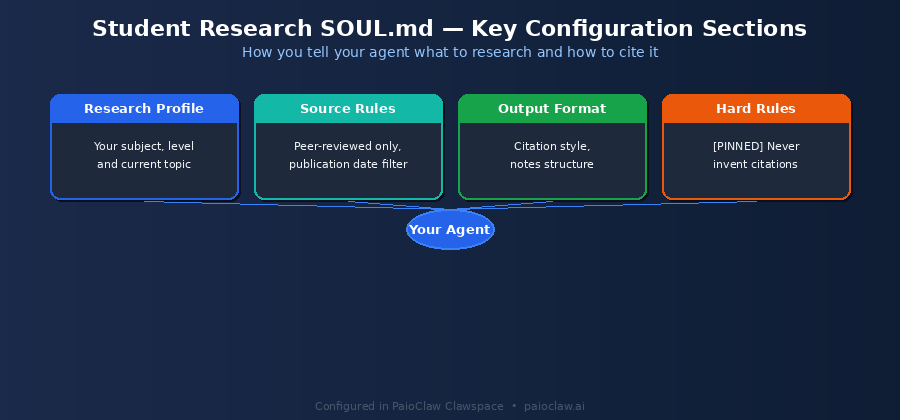
Step 5 — Set Up Your Daily Research Digest
This is the highest-value automation for students: a cron job that searches for new papers in your topic area every morning and delivers a digest to your Telegram before you start your day.
Go to Control > Cron Jobs, click New Job, and set it up like this:

Schedule: Every weekday at 7:30 AM

Task: Search arXiv and Google Scholar for papers published in the last 7 days

      on the topic: [your research topic].

      Return the top 5 most relevant results.

      For each: title, authors, publication date, 2-sentence summary,

      and a relevance note explaining why it matches my research focus.

      Send the digest to my Telegram.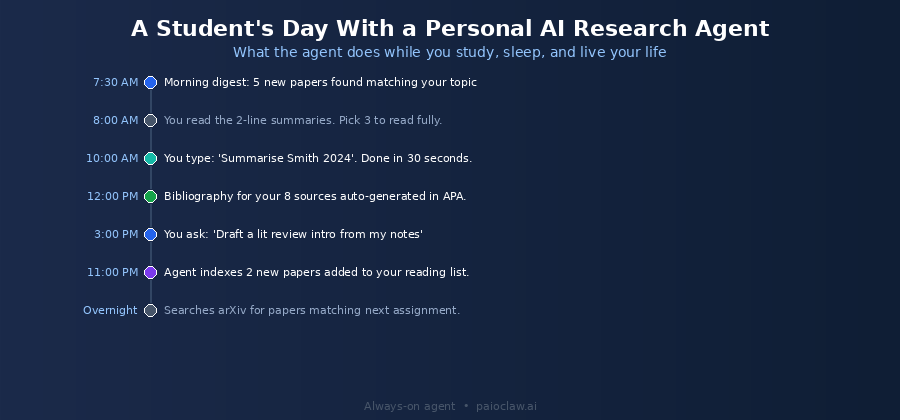
? The daily digest only works if your agent runs continuously
A self-hosted OpenClaw instance goes offline when your laptop closes. A 7:30 AM cron job requires an always-on agent.
PaioClaw keeps your agent running 24/7 in an isolated cloud instance. Your research digest arrives every morning whether your laptop is on or not.
Six Research Workflows to Run From Day One
Workflow 1: Summarise a PDF Paper in 30 Seconds
Upload a PDF to the chat or paste the arXiv URL and type:
Summarise this paper using the format in my SOUL.md.

Add it to my Research Notes sheet with the full citation in APA format.
Your agent reads the full paper, produces a structured summary with research question, methodology, findings, limitations, and topic relevance, and logs it to your Google Sheet with a formatted citation. What takes 45 minutes of careful reading for a dense 30-page paper takes 30 seconds.
Workflow 2: Build a Bibliography from Your Notes Sheet
When you are ready to submit, type:
Read my Research Notes Google Sheet and generate a complete APA bibliography

from all entries in the 'Citation' column. Sort alphabetically by author surname.
Your agent reads every row of your notes sheet and assembles a formatted reference list. What typically takes an hour of manual formatting takes under two minutes.
Workflow 3: Find Papers on a Specific Argument
When you need sources to support a specific claim in your essay, type:
Find 3 to 5 peer-reviewed papers published after 2019 that discuss

[specific argument or claim]. Focus on empirical studies.

For each paper: citation, key finding, and why it supports this argument.
Your agent searches arXiv, Semantic Scholar, and the open web, filters for peer-reviewed sources matching your date requirement, and returns a usable shortlist with citations ready to drop into your bibliography.
Workflow 4: Draft a Literature Review Structure
After accumulating 8 to 12 papers in your notes sheet, type:
Read my Research Notes sheet. Based on the papers summarised there,

draft a structured literature review outline for my essay on [topic].

Organise the outline by theme, not by paper. Suggest 4 to 5 main sections

and note which papers support each section.
This produces a thematic outline of your literature, not a paper-by-paper summary. This is the structure that distinguishes a competent literature review from a list of summaries, and it is the part students find hardest to construct. The agent does not write the review; it builds the scaffold.
Workflow 5: Answer Questions About a Paper Without Re-reading It
Three weeks after reading a paper, you need a specific detail for your essay. Type:
Based on the Smith 2022 entry in my Research Notes sheet,

what methodology did they use to measure [specific variable]?
Your agent reads your notes entry and answers from your stored summary. If the detail is not in the summary, it will tell you and suggest re-reading the section. No re-reading a full paper for a single footnote detail.
Workflow 6: Cross-Reference Arguments Across Papers
When you want to identify where your sources agree and disagree, type:
Read all entries in my Research Notes sheet.

For the argument that [specific claim], list which papers support it,

which contradict it, and which are neutral. Cite each paper by author and year.
This produces the kind of comparative analysis that takes hours to construct manually from a pile of paper notes. Your agent reads all your summaries and maps agreements and contradictions across your entire source base in one pass.
? PaioClaw’s memory system matters for long research projects
Each Claw maintains persistent memory across sessions. Your research topic, source preferences, citation format, and accumulated notes persist between every session.
On the Genius plan, 8x memory depth means the agent can hold a significantly larger research context, useful for dissertation-scale projects with dozens of sources.
AI Research Tools Compared
| Tool | Best For | Citations | Memory | Runs Overnight | Free |
| ChatGPT | Quick questions | No | No | No | Limited |
| Perplexity | Web search | Partial | No | No | Yes |
| Elicit | Literature search | Yes | No | No | Limited |
| Consensus | Finding academic agreement | Yes | No | No | Limited |
| OpenClaw on PaioClaw | Full research workflow | Yes — cited | Yes | Yes — cron | Yes (free plan) |
Academic Integrity: Using This Correctly
Using an AI research agent is not inherently academic misconduct. Misconduct is submitting AI-generated text as your own analysis or fabricating citations. Using an AI tool to find, summarise, and organise sources is equivalent to using a research database or a reference manager. The intellectual work, the argument formation, the critical analysis, and the writing are still yours.
Two rules to keep you on the right side of your institution’s policies:
- Always verify citations independently before including them. The PINNED rule in your SOUL.md prevents fabrication, but always cross-check DOIs against the actual database entry.
- Never submit a summary your agent produced as your own written analysis. Use summaries as research notes only. The synthesis, argument, and prose in your submission must be yours.
Time Savings: What You Actually Get Back
| Research Task | Manual Time (per assignment) | With AI Agent |
| Find 10 relevant papers | 3 to 4 hours | 15 to 20 minutes |
| Read and summarise 10 papers | 8 to 12 hours | 1 to 2 hours (review, not read) |
| Build bibliography (10 sources) | 45 to 60 minutes | 2 to 3 minutes |
| Organise thematic notes | 2 to 3 hours | 30 minutes |
| Draft literature review outline | 2 to 4 hours | 15 minutes (then you write) |
| Total per assignment | 15 to 24 hours | 3 to 5 hours |
? Free plan is enough to get started
PaioClaw’s free plan (Curious) gives 60 AI credits per month with no credit card required. That is enough to summarise 15 to 20 papers and build one full bibliography each month.
For heavier research workloads, the Smart plan at $24 per month with 200 credits handles a full semester of active research. Start free, upgrade when you need to.
Frequently Asked Questions
Using an AI tool to find and summarise sources is equivalent to using Google Scholar or Zotero as a reference manager. It is a research tool, not a ghostwriter. The analysis, argument, and writing in your submission must still be yours. Check your institution’s specific AI policy, as rules vary, and never submit AI-generated text as your own written work.
Not directly. The Web Search and Firecrawl skills access publicly available content. arXiv, SSRN, Google Scholar abstracts, and open-access journals are fully accessible. For paywalled content, download the PDF via your university library access and upload it directly to the chat for summarisation.
The PINNED rule in your SOUL.md instructs the agent not to fabricate citations and to flag any source it cannot verify with a real DOI. Despite this, always cross-check citations before including them in your work. Paste the DOI into doi.org to verify it resolves to the correct paper. This takes 10 seconds per citation.
Any subject with a significant body of publicly available research: social sciences, business, computer science, STEM, humanities with digital archives, and policy studies. It is less effective for highly specialised fields with most literature behind paywalls, or for subjects requiring primary source archives not available online.
Yes, with some additional configuration. For dissertation-scale research, use the Genius plan for 8x memory depth and 2,000+ skill connections. Set up separate Claws for different research streams if your dissertation spans multiple chapters with distinct literature bases. The daily arXiv digest is particularly valuable for PhD students needing to stay current with a fast-moving field over a multi-year project.
Yes. Your uploaded PDFs, research notes, and search queries are processed only within your isolated PaioClaw instance. PaioClaw does not access, share, or use your research data for any other purpose. Each Claw runs in a dedicated cloud environment separate from all other users.