

Most small business owners did not start their business to spend three hours a day copying numbers from receipts into spreadsheets, logging customer details from emails into a CRM, or updating stock counts after every sale. But that is exactly what happens. The admin accumulates, eats your evenings, and pulls you away from the actual work.
The good news: every one of those tasks can now be handled by an AI agent running 24/7 in the cloud, at a cost of about $4 per month in API fees on top of a free hosting plan. This guide shows you exactly how to set one up using OpenClaw on PaioClaw, with no technical background required.
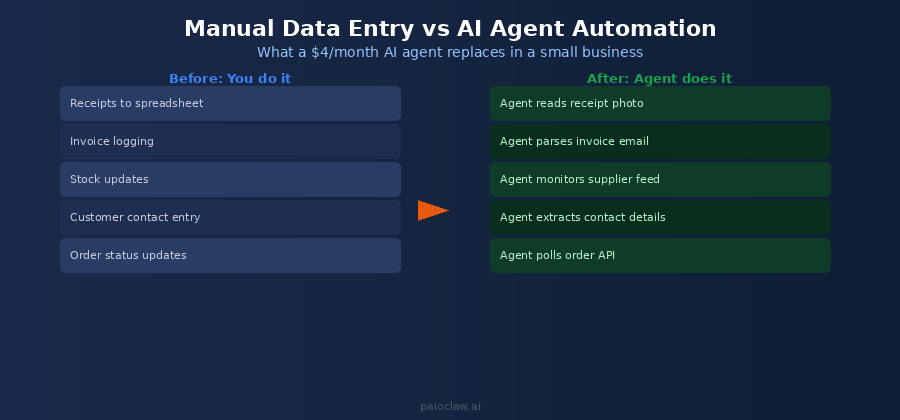
What Manual Data Entry Actually Costs a Small Business
The direct cost is easy to see: if you spend two hours per day on data entry at your own effective hourly rate, that is 10 hours per week, roughly 40 hours per month, on work that creates no new value. It maintains existing records. It does not grow the business.
But the indirect cost is often bigger. Manual entry is error-prone. Typos in customer contact fields, incorrect invoice totals, missed stock updates. These errors compound. A wrong address means a lost delivery. An uncorrected invoice means a late payment. A missing follow-up means a lost sale.
An AI data entry agent eliminates both the time cost and the error rate simultaneously. It reads the source document, extracts the structured data, and logs it to the right place, in the right format, every time.
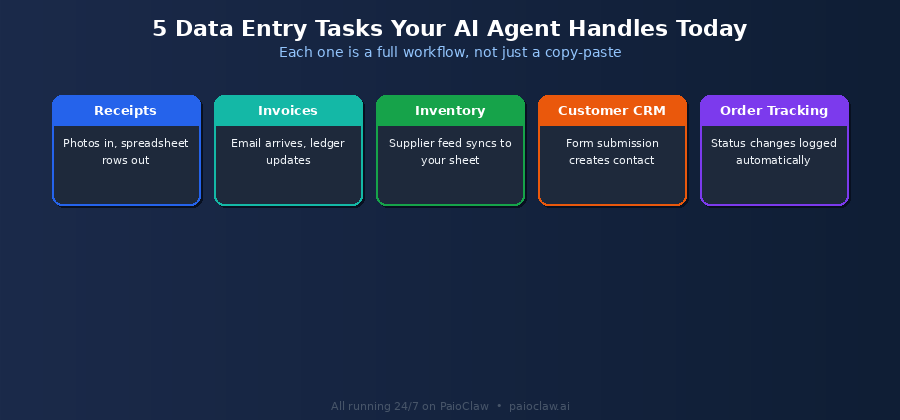
The Five Data Entry Tasks AI Handles Best
1. Receipt and Expense Logging
Take a photo of a receipt. Send it to your Telegram bot. Your agent reads the image, extracts merchant name, amount, date, and category, and logs it to your expense spreadsheet. No manual typing. No end-of-month pile to sort through.
2. Invoice Processing
Supplier invoices arrive by email. Your agent monitors your inbox, reads each invoice, extracts line items, totals, due dates, and supplier details, and logs them to your accounting sheet or bookkeeping tool. You get a Telegram notification for any invoice above a threshold you set.
3. Customer Contact Entry
When a customer fills in a contact form, sends an enquiry email, or leaves a voicemail, your agent extracts their details and creates or updates the contact record in your CRM. Every new lead is captured, categorised, and ready for follow-up without you touching it.
4. Inventory Updates
If your supplier sends a stock update by email or makes it available via a feed, your agent reads it and updates your inventory tracker automatically. Out-of-stock items trigger a Telegram alert so you can reorder before you run out.
5. Order Status Tracking
For businesses processing multiple orders per day, your agent checks order status APIs or inbox updates on a schedule and logs any status changes to your tracking sheet. Customers get consistent updates. You see a clean record of every order without checking five platforms manually.
? PaioClaw makes this work without a server
Every workflow above requires an agent running 24/7 to monitor emails, fire on schedules, and process incoming messages. PaioClaw hosts your OpenClaw agent in an always-on cloud instance. You do not need a VPS, Docker, or any infrastructure knowledge.
Start free at paioclaw.ai — no credit card required.
What It Actually Costs
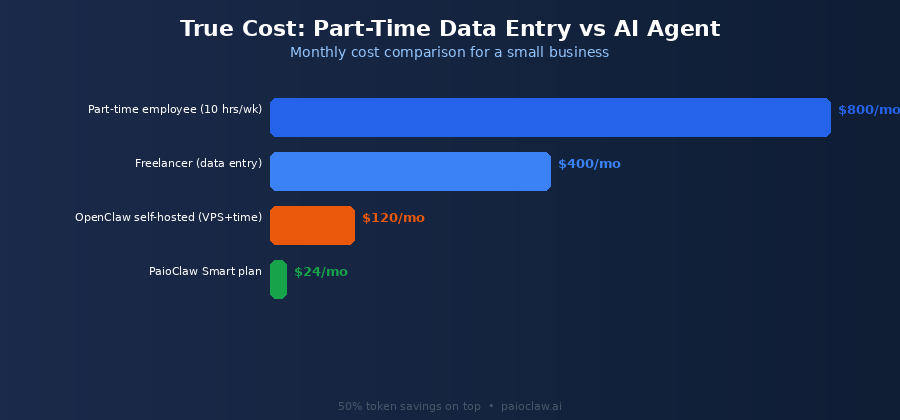
A typical small business data entry workload, processing receipts, invoices, customer contacts, and order updates across a day, uses roughly 100,000 to 200,000 tokens per month with a well-optimised agent. At GPT-4o mini pricing that is approximately $0.02 to $0.04 per day in API fees.
PaioClaw’s token optimisation engine reduces consumption by up to 50 percent on top of that. The Smart plan at $24 per month gives you 200 credits, unlimited daily usage, and 1,000+ one-click skill integrations. Most small businesses run their full data entry automation for under $30 per month all in.
Compare that to a part-time data entry employee at $800 to $1,200 per month, or a freelancer at $400 to $600 per month for the same hours. The economics are not close.
Setting Up Your First Data Entry Agent
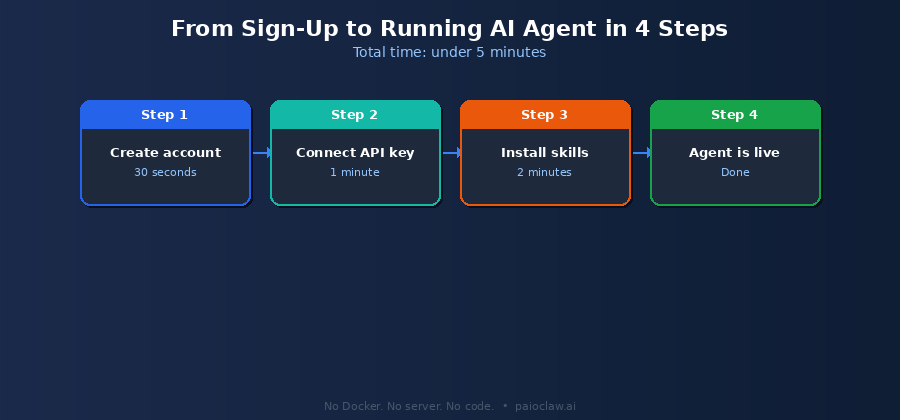
Step 1 — Create Your PaioClaw Account
Go to paioclaw.ai and sign up with Google or email. No credit card needed to start. You land in the Clawspace dashboard. Click Create New Claw and give it a name like “Data Entry Agent” or “Small Business Ops”.
Step 2 — Connect Your API Key
Go to AI Models in the sidebar. Paste your OpenAI or Anthropic API key. This is the only technical step in the entire setup. The key talks directly to your provider. PaioClaw handles everything else.
Step 3 — Install Your Skills
Go to Agent > Skills and install the integrations that match your workflows:
- Gmail or Outlook: for monitoring invoice and customer emails
- Google Sheets: for logging all extracted data
- Telegram: for notifications and sending tasks by message
- HubSpot or a CRM skill: for customer contact management
- File Reader: for processing PDFs and receipt images
Step 4 — Write Your SOUL.md Instructions
SOUL.md is the plain-English instruction file that tells your agent what to do. Here is a starter template for small business data entry:
# SOUL.md — Small Business Data Entry Agent

## Identity

You are a data entry assistant for [Business Name].

Your job is to keep our records accurate and up to date automatically.

## Tasks

1. Monitor Gmail every 2 hours for invoices and customer enquiries.

2. For each invoice email: extract supplier, amount, due date.

   Log to Google Sheet named 'Invoices' in columns A-E.

3. For each customer enquiry: extract name, email, phone, message.

   Create a new contact in HubSpot.

4. Every evening at 6pm: send me a Telegram summary of

   everything logged today.

## Hard Rules

[PINNED] Never delete existing data. Only add or update.
[PINNED] If any value is unclear, leave the field blank.
         Do not guess or infer missing information.
Step 5 — Set Up Your Scheduled Tasks
Go to Control > Cron Jobs. Create jobs for each recurring task. For example:

Job 1 — Every 2 hours on weekdays:

Check Gmail for new invoices and customer emails. Process and log.

Job 2 — Every day at 9am:

Check inventory sheet. Flag any items below minimum stock level.

Send alert to Telegram if any items need reordering.

Job 3 — Every Friday at 5pm:

Produce a weekly summary: invoices received, new contacts,

orders processed. Send to Telegram.
? This is how a $24/mo plan replaces a $800/mo task
Once your cron jobs are running, your agent handles the monitoring, extraction, logging, and notification loop automatically. You check your Telegram summary each evening and deal only with exceptions.
The free plan is enough to validate the workflow. Upgrade when you are ready to remove the daily cap.
Common Mistakes to Avoid
Mistake 1: Starting With Too Many Tasks at Once
Pick one workflow, invoice logging or customer contact entry, and get it working cleanly before adding more. Validate that the extracted data matches the source documents for five to ten cycles. Once that is solid, add the next task.
Mistake 2: Not Checking the Activity Log
The Activity Log (Smart plan and above) shows exactly what your agent processed and what it logged on each run. Check it daily for the first two weeks. This is how you catch misinterpretations in your SOUL.md instructions before they affect a month of records.
Mistake 3: Skipping the No-Guessing Rule
Without the PINNED instruction to leave unclear fields blank, your agent may infer values from context. In data entry that means fabricated numbers in your accounting records. Always include the explicit rule: “If any value is unclear, leave the field blank. Do not guess.”
Comparison: Doing It Yourself vs Hiring vs AI Agent
| Method | Monthly Cost | Error Rate | Hours Freed | Always-On |
| You do it | Your time | Human (fatigue) | 0 | No |
| Part-time employee | $800-1,200 | Human | Partial | No |
| Freelancer | $400-600 | Human | Partial | No |
| OpenClaw self-hosted | VPS + your time | Low (configured) | Full | Only if server up |
| PaioClaw Smart plan | $24 + ~$4 API | Very low | Full | Yes — 24/7 |
No technical skills required
Every step in this guide uses PaioClaw’s dashboard interface. There is no terminal, no Docker, no server configuration. If you can write a bullet-point instruction list, you can configure this agent.
Frequently Asked Questions
No. PaioClaw is built for non-technical users. You write your agent’s instructions in plain English in the SOUL.md editor, install skills by clicking Install, and set up schedules through a form interface. There is nothing to code.
Two things protect you. First, the PINNED rule in your SOUL.md tells the agent to leave any unclear field blank rather than guess. Second, the Activity Log shows every extraction the agent made. Review it during the first two weeks to catch any consistent misreads and adjust your instructions accordingly.
Yes, when you connect a vision-capable model like GPT-4o. You can send receipt photos to your Telegram bot and the agent reads the image, extracts merchant, amount, date, and category, and logs it to your sheet. The File Reader skill also handles PDF invoices directly.
PaioClaw supports Google Sheets, Notion, Airtable, HubSpot, Pipedrive, and Salesforce through its skill library. If your tool has a public API, it can be connected. The agent writes to your existing structure using column names or field names you specify in the SOUL.md.
Yes. Each PaioClaw agent runs in an isolated cloud instance. Your invoices, customer data, and business records are not shared with other users, not used for training, and only processed to complete the tasks you configure. All data is encrypted at rest and in transit.